Showing posts with label KoAgu. Show all posts

Thursday, 23 August 2007

WhatsNew - KoAgu v0.1a

KoAgu 0.1a

* Added: Scale Option -> bestFit + stretchToFit
* Fixed: Rescale issue, now only accept dimension lower than the original file
* Improved: N/A


I'll add/fix several features from time to time. Wait till the next release (dunno when, now I'm lazy :D)

Wednesday, 22 August 2007

KoAgu - First Version

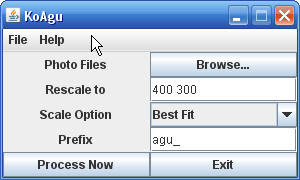
I'm naming my thumbnail maker program as KoAgu... not so important!!! Ok la, just for a couple of hours I manage to get my program working using simple compression algorithm and only support jpg file at the moment. Here are the screenshots.

1. The Main Window


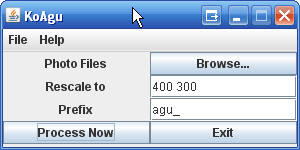
As you can see, there's Browse button to browse pics to be resized. I also provide rescale option where the two numbers are the pic dimension after rescaled. The first number is its width (e.g 400) and the second number is its height (e.g 300). By default I put "400 300" but users can change it as they wish.

Prefix is used to name the files that have been resized, e.g. if your original filename is "duolulu.jpg", and your prefix is "agu_", then the new filename will be "agu_duolulu.jpg". I included this feature in case user accidentally replace the original file.

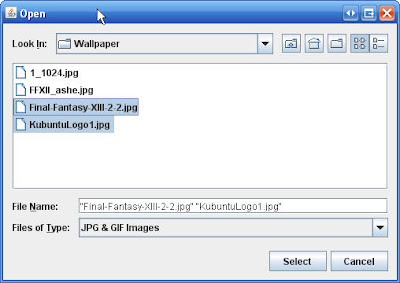
2. After a user click Browse button, a pop-up window will appear. This allow the user to select "jpg" file to be processed. To select more than one file at a time.. hold the Ctrl key at the keyboard + select the chosen files.


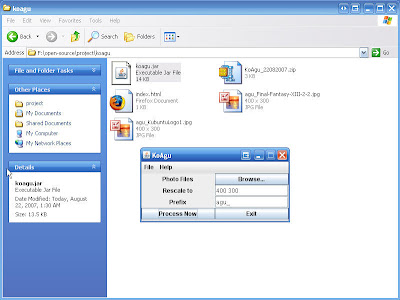
3. Then finally, click the Process Now. Done!!! Check the new files inside the program directory.


You can download it here (get the bytecode). This program is not good enough. Ah.. what do you expect for a program that is written only for a few hours.. bah.

Tuesday, 21 August 2007

My Boring Project - Thumbnail Maker

I'm not quite busy these days, so why not creating a useful program (self-interest). Ah.. almost everyday I chat with my friend(s) in msn, and sometimes we exchange new photos (not self photos.. :D). Every photo has a size about 1++mb, so I usually resize each photo to reduce its size. Otherwise it will take a long time to transfer and prone to fail transfer.

Lame Problem
The problem is when I'm not exchanging for JUST one picture, but many!!! It will be time consuming if I open each picture, then resize, finally save as a new file. So I need a program that can resize and save all my photos at ONE go!!!

Lame Solution
Since I'm the one who need it so I have to program it myself.. :D

To Do List (Basic Features):-
- provide interface to browse file(s) to be resized
- resize settings e.g. new pic size.
- ...

For the time being, I'm going to implement it regardless the algorithm used. Ah.. as usual, I'm going to program it using JAVA.. no python.. no ruby.. hehe. So wait for the first version soon.. bah.